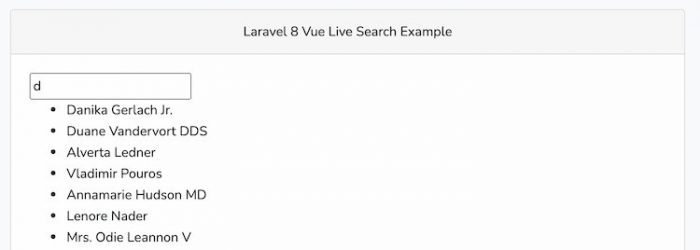
This is a comprehensive Laravel Vue component live search tutorial helps you with a real-world example to understand how to integrate live search in Laravel Vue js application from scratch.
Live search is an advanced UI component that gives suggestion in response to the user’s query. AJAX amplifies the live search moreover It is also known as autocomplete search.
Ideally, it displays the recommendations as the user starts typing into the HTML input field of live search.
Throughout this tutorial, you will create a basic laravel application, learn to add database details in ENV file to make db connection, Create model, migration, routes, controller, implement Vue component and display live search in laravel vue js app.
Let’s learn how to implement live search in laravel vue js application.
Create Laravel Project
Begin with installing a new laravel app using the following command in your console window:
composer create-project laravel/laravel laravel-vue-live-search-example --prefer-distConnecting Database
Head over to project root, add your database details in .env configuration file to make the database connection:
DB_CONNECTION=mysql
DB_HOST=127.0.0.1
DB_PORT=3306
DB_DATABASE=db
DB_USERNAME=root
DB_PASSWORD=
If you are using MAMP local server in macOs; make sure to append UNIX_SOCKET and DB_SOCKET below database credentials in .env file.
UNIX_SOCKET=/Applications/MAMP/tmp/mysql/mysql.sock
DB_SOCKET=/Applications/MAMP/tmp/mysql/mysql.sock
Set Up Model and Run Migration
Next up, you need to generate a new model using below command:
php artisan make:model Book -mPut code in app/Models/Book.php:
namespace AppModels;
use IlluminateDatabaseEloquentFactoriesHasFactory;
use IlluminateDatabaseEloquentModel;
class Book extends Model
{
    use HasFactory;
    protected $fillable = [
        'name',
        'author'
    ];
}
You need to define the table values in migration file in database/migrations/create_books_table.php:
use IlluminateDatabaseMigrationsMigration;
use IlluminateDatabaseSchemaBlueprint;
use IlluminateSupportFacadesSchema;
class CreateBooksTable extends Migration
{

    public function up()
    {
        Schema::create('books', function (Blueprint $table) {
            $table->id();
            $table->string('name');
            $table->string('author');
            $table->timestamps();
        });
    }

    public function down()
    {
        Schema::dropIfExists('books');
    }
}
Next, run the database migration:
php artisan migrateInstall Vue UI in Laravel
Run composer command to install laravel UI in laravel app, the laravel laravel/ui offers a simple solution to scaffold all the required auth controller, routes, and views:
composer require laravel/uiInstall Vue js components with the help of node package manager command:
php artisan ui vueRun command to compile your fresh scaffolding:
npm installAdding Test Data with Faker
You have to create a factory class for Book model, and it will help you make the test data for laravel vue js live search.
php artisan make:factory BookFactory --model=Post
Define faker function in databasefactoriesBookFactory.php file:
namespace DatabaseFactories;
use AppModelsBook;
use IlluminateDatabaseEloquentFactoriesFactory;
class BookFactory extends Factory
{

    protected $model = Book::class;

    public function definition()
    {
        return [
            'name' => $this->faker->name,
            'author' => $this->faker->name
        ];
    }
}
Run factory tinker command:
php artisan tinkerOnce entered into Psy shell then generate the dummy data:
Book::factory()->count(50)->create()Create Controller
Head over to console window and execute command to create a Book controller:
php artisan make:controller BookControllerGet inside appHttpControllersBookController.php file and place the following code within:
namespace AppHttpControllers;
use IlluminateHttpRequest;
use FacadesAppRepositoryPosts;
use AppModelsBook;
class BookController extends Controller
{
    public function index()
    {
        return view('welcome');
    }
    public function getBooks(Request $request)
    {
        $data = Book::where('name', 'LIKE','%'.$request->keyword.'%')->get();
        return response()->json($data);
    }
}
Add Routes
Open routes/web.php file, in here define routes to handle live search in laravel vue app:
use IlluminateSupportFacadesRoute;
use AppHttpControllersBookController;

Route::get('/', [BookController::class, 'index']);

Route::get('/livesearch', [BookController::class, 'getBooks']);
Build Laravel Vue Component
Head over to resources/js/components/ folder, inside here create AutocompleteComponent.vue file.
Further, update resources/js/components/AutocompleteComponent.vue file to define Vue Js autocomplete component.
<template>
    <div>
        <input type="text" v-model="keyword">
        <ul v-if="Books.length > 0">
            <li v-for="book in Books" :key="book.id" v-text="book.name"></li>
        </ul>
    </div>
</template>
<script>
export default {
    data() {
        return {
            keyword: null,
            Books: []
        };
    },
    watch: {
        keyword(after, before) {
            this.getResults();
        }
    },
    methods: {
        getResults() {
            axios.get('/livesearch', { params: { keyword: this.keyword } })
                .then(res => this.Books = res.data)
                .catch(error => {});
        }
    }
}
</script>
Next, define the Vue component in resources/js/app.js:
require('./bootstrap');
window.Vue = require('vue');


Vue.component('autocomplete-component', require('./components/AutocompleteComponent.vue').default);

const app = new Vue({
    el: '#app',
});
Finally, define the vue component in resources/views/welcome.blade.php to display the autocomplete component:
@extends('layout.app')
@section('content')
<div class="container">
    <div class="row justify-content-center">

        <div class="col-md-8">
            <div class="card">
                <div class="card-header text-center">Laravel 8 Vue Autocomplete Example</div>

                <div class="card-body">
                  <autocomplete-component></autocomplete-component>
                </div>

            </div>
        </div>
    </div>
</div>
@endsection
Head over to resources/views/ directory create layout directory, also build a app.blade.php file.
Afterwards, place the following code in resources/views/layout/app.blade.php:
<!doctype html>
<html>
<head>
    <meta charset="utf-8">
    <meta name="viewport" content="width=device-width, initial-scale=1">
    <meta name="csrf-token" content="{{ csrf_token() }}">

    <title>Laravel Vue JS Live Search Demo</title>

    <script src="{{ asset('js/app.js') }}" defer></script>
    <link href="{{ asset('css/app.css') }}" rel="stylesheet">

</head>
<body>
    <div id="app">

        <main class="py-4">
            @yield('content')
        </main>

    </div>
</body>
</html>
Thereafter, you have to open the console and run the node development server:
npm run watchOpen another console as well and start the laravel development server:
php artisan serveHere is the owl carousel slider integration example in Laravel and Vue js application:
http://127.0.0.1:8000
Conclusion
This tutorial is over, and you have learned how to create live search immaculately in the laravel vue js application.
You have seen the multiple learning paradigm about laravel live search development functionality through this tutorial. I hope you liked it and share it with others.
You can download the complete code from GitHub.