In this tutorial, we will ascertain how to get location information using ip address in the laravel application using location package.
Also, we will install and configure “stevebauman/location” composer package to get location information of specific IP address in the laravel app.
The stevebauman/location is an excellent library for detecting a users location by their IP Address, and It made retrieving a user’s location information from IP address exorbitantly effortless.
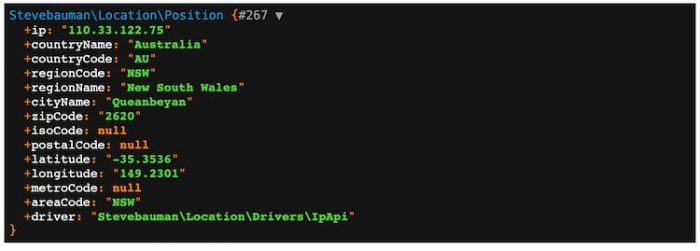
Here is the complete list of location information that we are going to get based on IP address in laravel app with location library:
- Country name and code
- Region name and code
- City name
- Zipcode
- ISO code
- Postal code
- Latitude and longitude
- Metro code
Create Laravel Project
Make sure you have composer package installed on your development system. Move to terminal, open a new window and execute command to create or install a new laravel application:
composer create-project laravel/laravel laravel-get-location-information-example --prefer-distMake Database Connection
In the second step, you need to append database name, user name and password in .env config file:
DB_CONNECTION=mysql
DB_HOST=127.0.0.1
DB_PORT=3306
DB_DATABASE=databse
DB_USERNAME=root
DB_PASSWORD=
If you are using MAMP local server in macOs; make sure to append UNIX_SOCKET and DB_SOCKET below database credentials in .env file.
UNIX_SOCKET=/Applications/MAMP/tmp/mysql/mysql.sock
DB_SOCKET=/Applications/MAMP/tmp/mysql/mysql.sock
Install Location Package
Now, this is the time to evoke the stevebauman/location package installation; execute a command in the console:
composer require stevebauman/locationRegister Location Package
Once the location package is successfully installed then after, you have to register the package classes in providers and aliases arrays:
Add the following code in config/app.php file:
'providers' => [
    ....
    ....
    ....

    StevebaumanLocationLocationServiceProvider::class,

],

'aliases' => [
    ....
    ....
    ....

    'Location' => 'StevebaumanLocationFacadesLocation',

]
Consequently, you have to publish the location vendor file separately.
Run the following command:
Which provider or tag’s files would you like to publish?
In response to the above question choose following provider from the options list using a number prefix:
Provider: StevebaumanLocationLocationServiceProviderphp artisan vendor:publishYou can also check on the config/location.php path.
return [

    'driver' => StevebaumanLocationDriversIpApi::class,

    'fallbacks' => [
        StevebaumanLocationDriversIpInfo::class,
        StevebaumanLocationDriversGeoPlugin::class,
        StevebaumanLocationDriversMaxMind::class,
    ],

    'position' => StevebaumanLocationPosition::class,

    'maxmind' => [
        'web' => [
            'enabled' => false,
            'user_id' => '',
            'license_key' => '',
            'options' => [
                'host' => 'geoip.maxmind.com',
            ],
        ],
        'local' => [
            'path' => database_path('maxmind/GeoLite2-City.mmdb')
        ],
    ],

    'ip_api' => [
        'token' => env('IP_API_TOKEN'),
    ],

    'ipinfo' => [
        'token' => env('IPINFO_TOKEN'),
    ],

    'testing' => [
        'enabled' => env('LOCATION_TESTING', true),
        'ip' => '66.102.0.0',
    ],
];
Generate and Setting Up Controller
Further, you need to generate a controller in this file; we will create the function to handle the request to fetch the location information and pass it on to view:
:Open and define the following code in appHttpControllersLocationController.php file:
namespace AppHttpControllers;
use IlluminateHttpRequest;
class LocationController extends Controller
{
    public function index(Request $request)
    {
            $userIp = $request->ip();
            $locationData = Location::get($userIp);

            dd($locationData);
    }
}
Build Routes
You need to import LocationController in the routes/web.php file and define a route with the get method to call the index method for showing user location information based on IP address:
use IlluminateSupportFacadesRoute;
use AppHttpControllersLocationController;


Route::get('show-user-location-data', [LocationController::class, 'index']);
Check Location Information
You have to start the laravel project with the artisan serve command:
php artisan serveOpen the following URL to access location information with IP address:
http://127.0.0.1:8000/show-user-location-data
Summary
This tutorial is over; in the above example, we explained how to access user’s location information (country name, country code, region code, city name, zip code, iso code, postal code, latitude, longitude, metro code, area code) using the IP address in Laravel app equally important stevebauman/location plugin.